> ## Documentation Index
> Fetch the complete documentation index at: https://docs-staging-feat-docs-5551-enterprise-connect.mintlify.site/llms.txt
> Use this file to discover all available pages before exploring further.

# Introduction aux flux

> Cette section décrit comment utiliser les flux et les formulaires.

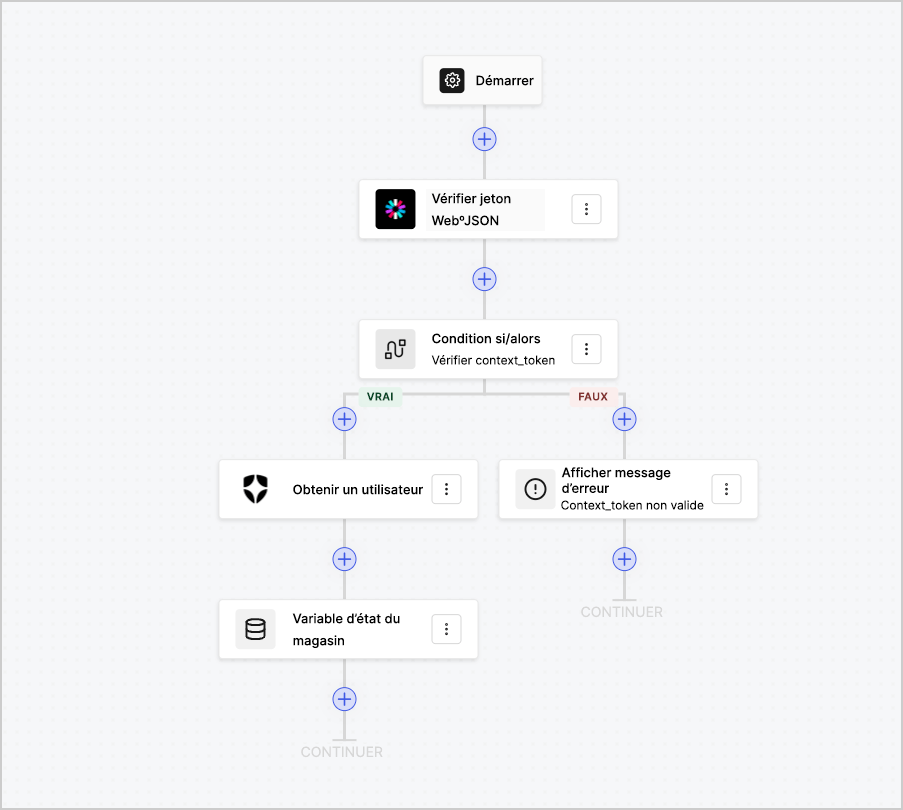
Les flux vous permettent de créer visuellement la logique côté serveur qui peut être exécutée dans vos formulaires et de gérer les informations recueillies, d’intégrer tout service avec une API ou de déclencher des automatisations.
<Frame>
  <img src="https://mintcdn.com/docs-staging-feat-docs-5551-enterprise-connect/KJau0972Qp0TIXIZ/docs/images/fr-ca/cdy7uua7fh8z/6u6Huh5CbH3GEQJv3AH7cx/d334ea608b071acd6e77f424283e0234/Flows.png?fit=max&auto=format&n=KJau0972Qp0TIXIZ&q=85&s=bb441ed0f52c4febcc240988151c5262" alt="Dashboard > Forms > Flows" data-og-width="903" width="903" data-og-height="810" height="810" data-path="docs/images/fr-ca/cdy7uua7fh8z/6u6Huh5CbH3GEQJv3AH7cx/d334ea608b071acd6e77f424283e0234/Flows.png" data-optimize="true" data-opv="3" srcset="https://mintcdn.com/docs-staging-feat-docs-5551-enterprise-connect/KJau0972Qp0TIXIZ/docs/images/fr-ca/cdy7uua7fh8z/6u6Huh5CbH3GEQJv3AH7cx/d334ea608b071acd6e77f424283e0234/Flows.png?w=280&fit=max&auto=format&n=KJau0972Qp0TIXIZ&q=85&s=e48df05b87ca864b961ef08b11f6f752 280w, https://mintcdn.com/docs-staging-feat-docs-5551-enterprise-connect/KJau0972Qp0TIXIZ/docs/images/fr-ca/cdy7uua7fh8z/6u6Huh5CbH3GEQJv3AH7cx/d334ea608b071acd6e77f424283e0234/Flows.png?w=560&fit=max&auto=format&n=KJau0972Qp0TIXIZ&q=85&s=03c33ae90db7cb5e3e86466230d49646 560w, https://mintcdn.com/docs-staging-feat-docs-5551-enterprise-connect/KJau0972Qp0TIXIZ/docs/images/fr-ca/cdy7uua7fh8z/6u6Huh5CbH3GEQJv3AH7cx/d334ea608b071acd6e77f424283e0234/Flows.png?w=840&fit=max&auto=format&n=KJau0972Qp0TIXIZ&q=85&s=8ad52d6003e9b3c7041aa73014803419 840w, https://mintcdn.com/docs-staging-feat-docs-5551-enterprise-connect/KJau0972Qp0TIXIZ/docs/images/fr-ca/cdy7uua7fh8z/6u6Huh5CbH3GEQJv3AH7cx/d334ea608b071acd6e77f424283e0234/Flows.png?w=1100&fit=max&auto=format&n=KJau0972Qp0TIXIZ&q=85&s=72f8c4ba45995810e2bbb2dc8dcfd90d 1100w, https://mintcdn.com/docs-staging-feat-docs-5551-enterprise-connect/KJau0972Qp0TIXIZ/docs/images/fr-ca/cdy7uua7fh8z/6u6Huh5CbH3GEQJv3AH7cx/d334ea608b071acd6e77f424283e0234/Flows.png?w=1650&fit=max&auto=format&n=KJau0972Qp0TIXIZ&q=85&s=bf77a9c1045359ec01218a66cce683d4 1650w, https://mintcdn.com/docs-staging-feat-docs-5551-enterprise-connect/KJau0972Qp0TIXIZ/docs/images/fr-ca/cdy7uua7fh8z/6u6Huh5CbH3GEQJv3AH7cx/d334ea608b071acd6e77f424283e0234/Flows.png?w=2500&fit=max&auto=format&n=KJau0972Qp0TIXIZ&q=85&s=357f78d294cbad6b8729272ab5a1ebf8 2500w" />
</Frame>

Vous pouvez utiliser les actions des flux avec votre formulaire pour :

* Créer des validations personnalisées côté serveur pour les étapes de votre formulaire.
* Intégrer votre propre API en effectuant des requêtes HTTP personnalisées.
* Intégrer des tiers en utilisant nos intégrations prêtes à l’emploi.
* Exécuter différentes logiques d’entreprise en fonction des saisies ou des propriétés de l’utilisateur.
* Valider les données à l’aide de jetons Web JSON.
